MaterialXWeb 1.39.5
Utilities for using MaterialX Packages with Web clients
Loading...
Searching...
No Matches
MaterialX_GPUOpen_Client Class Reference
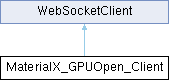
Inheritance diagram for MaterialX_GPUOpen_Client:
WebSocketClient

Public Member Functions

 constructor (socketLibrary, server)
 findMaterialByName (name)
 updateStatusInput (message, force=false)
 selectMaterialByName (name)
 highlightSelectedMaterialInGallery (name)
 handleMaterialXDownLoad (data)
 handleMaterialXExtract (data)
 extractMaterials ()
 downloadMaterials ()
Public Member Functions inherited from WebSocketClient
 constructor (socketLibrary, server)
async initialize (socketLibrary, server)
 setupEventHandlers ()
 emit (message, data)
 constructor (socketLibrary, server)
async initialize (socketLibrary, server)
 setupEventHandlers ()
 emit (message, data)
 constructor (socketLibrary, server)
async initialize (socketLibrary, server)
 setupEventHandlers ()
 emit (message, data)

Detailed Description

Definition at line 3 of file MaterialXGPUOpenClient.js.

Member Function Documentation

◆ constructor()

MaterialX_GPUOpen_Client::constructor ( socketLibrary,
server )

Definition at line 5 of file MaterialXGPUOpenClient.js.

5 {
6 // Call parent to setup socket I/O.
7 super(socketLibrary, server);
8
9 this.editor = null;
10 this.extractedEditor = null;
11 this.materialsList = [];
12 this.materialNames = [];
13 this.materialCount = 0;
14
15 // Bind class methods to `this`
16 this.findMaterialByName = this.findMaterialByName.bind(this);
17 this.populateForm = this.populateForm.bind(this);
18 this.setupEventHandlers = this.setupEventHandlers.bind(this);
19 this.setupXML = this.setupXML.bind(this);
20
21 // Setup XML editors
22 this.setupXML();
23 }

◆ downloadMaterials()

MaterialX_GPUOpen_Client::downloadMaterials ( )

Definition at line 293 of file MaterialXGPUOpenClient.js.

293 {
294 console.log("WEB: Emitting download_materialx event");
295 let downloadSpinner = document.getElementById('download_spinner');
296 let downloadStatus = document.getElementById('download_status');
297 downloadSpinner.classList.remove('d-none'); // Show spinner
298 downloadStatus.innerText = 'Fetching...';
299 let from_package = document.getElementById('download_from_package').checked;
300 this.emit('download_materialx', { 'frompackage': from_package });

◆ extractMaterials()

MaterialX_GPUOpen_Client::extractMaterials ( )

Definition at line 280 of file MaterialXGPUOpenClient.js.

280 {
281 const extractSpinner = document.getElementById('extract_spinner');
282 const extractStatus = document.getElementById('extract_status');
283 extractSpinner.classList.remove('d-none'); // Show spinner
284 extractStatus.innerText = 'Extracting...';
285
286 const materialSelect = document.getElementById('materialSelect');
287 const update_mtlx = document.getElementById('update_mtlx').checked;
288 let selectedItem = materialSelect.options[materialSelect.selectedIndex].text;
289 console.log("WEB: Emitting extract_material event");
290 this.emit('extract_material', { expression: selectedItem, update_materialx: update_mtlx });
291 }

◆ findMaterialByName()

MaterialX_GPUOpen_Client::findMaterialByName ( name)

Definition at line 26 of file MaterialXGPUOpenClient.js.

26 {
27 let foundMaterial = null;
28
29 for (const element of this.materialsList) {
30 let resultsArray = JSON.parse(element).results;
31 if (resultsArray) {
32 for (const result of resultsArray) {
33 if (result.title === name) {
34 foundMaterial = result;
35 console.log('>>>>>>>>>> Popultate form:', result.title);
36 this.populateForm(result);
37 return foundMaterial;
38 }
39 }
40 }
41 }
42 return null; // Return null if no match is found
43 }

◆ handleMaterialXDownLoad()

MaterialX_GPUOpen_Client::handleMaterialXDownLoad ( data)

Definition at line 85 of file MaterialXGPUOpenClient.js.

86 {
87 const downloadSpinner = document.getElementById('download_spinner');
88 const downloadStatus = document.getElementById('download_status');
89 downloadSpinner.classList.add('d-none'); // Hide spinner
90 downloadStatus.innerText = 'Fetch Materials';
91
92 console.log('WEB: materialx downloaded event:', data);
93 this.materialCount = data.materialCount;
94 this.materialsList = data.materialsList;
95 this.materialNames = data.materialNames;
96 // Sort materialNames alphabetically
97 this.materialNames.sort((a, b) => a.localeCompare(b));
98
99 if (this.materialCount > 0) {
100 let listString = '';
101 for (const element of this.materialsList) {
102 listString += element + '\n';
103 }
104 this.editor.setValue(listString);
105
106 // Populate the material select dropdown
107 const materialSelect = document.getElementById('materialSelect');
108 materialSelect.innerHTML = ''; // Clear existing options
109 this.materialNames.forEach((name, index) => {
110 const option = document.createElement('option');
111 option.value = index + 1;
112 option.text = name;
113 materialSelect.appendChild(option);
114 });
115
116 // Populate the form with the first material
117 const firstMaterial = JSON.parse(this.materialsList[0]).results[0];
118 if (firstMaterial) {
119 this.populateForm(firstMaterial);
120 }
121
122 // Render preview images in gallery using preview URL from backend
123 const gallery = document.getElementById('material_gallery');
124 gallery.innerHTML = '';
125 let firstTitle = '';
126 for (const element of this.materialsList) {
127 let materials = JSON.parse(element).results;
128 if (materials) {
129 // Sort by title
130 materials.sort((a, b) => a.title.localeCompare(b.title));
131 for (const material of materials)
132 {
133 if (material.url) {
134 if (!firstTitle)
135 firstTitle = material.title;
136
137 const col = document.createElement('div');
138 col.className = 'col-sm-4 col-md-3 col-lg-2 mb-4';
139
140 col.innerHTML = `
141 <div class="card material-card" data-material-id="${material.title}">
142 <img src="${material.url}" id="${material.title} Image" class="card-img-top material-img" alt="${material.title}">
143 <div class="card-body">
144 <div style="font-size: 10px;" class="card-title">${material.title}</div>
145 </div>
146 </div>
147 `;
148
149 // Select material when clicking on the card
150 col.querySelector('.card').addEventListener('click', () => {
151 this.highlightSelectedMaterialInGallery(material.title);
152 this.selectMaterialByName(material.title);
153 });
154 gallery.appendChild(col);
155 }
156 }
157 }
158 }
159
160 if (firstTitle) {
161 this.highlightSelectedMaterialInGallery(firstTitle);
162 this.selectMaterialByName(firstTitle);
163 }
164 }
165 }

◆ handleMaterialXExtract()

MaterialX_GPUOpen_Client::handleMaterialXExtract ( data)

Definition at line 167 of file MaterialXGPUOpenClient.js.

168 {
169 const extractSpinner = document.getElementById('extract_spinner');
170 extractSpinner.classList.add('d-none'); // Hide spinner
171 const extractStatus = document.getElementById('extract_status');
172 extractStatus.innerText = 'Extract';
173
174 console.log('WEB: materialx extracted event:', data.extractedData);
175 const extractedData = data.extractedData[0];
176 if (!extractedData) {
177 console.log('No extracted data received');
178 return;
179 }
180 const title = extractedData.title;
181 console.log('Title:', title);
182
183 const preview_url = extractedData.url;
184 console.log('URL:', preview_url);
185
186 const dataObj = extractedData.data;
187 const imageDOM = document.getElementById('extracted_images');
188 imageDOM.innerHTML = ''; // Clear existing images
189
190 const mtlxDOM = document.getElementById('extracted_mtlx');
191 this.extractedEditor.setValue('');
192
193 // Extract MTLX and images out.
194 // Optionally save zip of data to file.
195 let save_extracted = document.getElementById('save_extracted').checked;
196 let zip = save_extracted ? new JSZip() : null;
197
198
199 if (preview_url) {
200 const imageContainer = document.createElement('div');
201 imageContainer.className = 'col-sm-4 col-md-3 col-lg-2 mb-4';
202 let key = "Preview Render";
203 imageContainer.innerHTML = `
204 <div class="card material-card" data-material-id="${key}">
205 <img loading="lazy" src="${preview_url}" id="${key} Image" class="card-img-top material-img" alt="${key}">
206 <div class="card-body">
207 <div style="font-size: 10px;" class="card-title">${key}</div>
208 </div>
209 </div>
210 `;
211
212 // Add "url.txt" file to zip where "url" is the preview URL, for reference
213 if (zip)
214 {
215 const urlFile = new File([preview_url], "url.txt", { type: 'text/plain' });
216 zip.file("url.txt", urlFile);
217 }
218
219 imageDOM.appendChild(imageContainer);
220 }
221
222 for (const key in dataObj) {
223 if (key.endsWith('.mtlx')) {
224 this.extractedEditor.setValue(dataObj[key]);
225 // Add the extracted MaterialX file to the zip
226 if (zip)
227 zip.file(key, dataObj[key]);
228 } else {
229 const base64String = dataObj[key];
230 const binary = atob(base64String);
231 const array = new Uint8Array(binary.length);
232 for (let i = 0; i < binary.length; i++) {
233 array[i] = binary.charCodeAt(i);
234 }
235 const extension = key.split('.').pop();
236 const blob = new Blob([array], { type: `image/${extension}` });
237 const url = URL.createObjectURL(blob);
238
239 // Create a container for the image and label
240 const imageContainer = document.createElement('div');
241 imageContainer.className = 'col-sm-4 col-md-3 col-lg-2 mb-4';
242 imageContainer.innerHTML = `
243 <div class="card material-card" data-material-id="${key}">
244 <img src="${url}" id="${key} Image" class="card-img-top material-img" alt="${key}">
245 <div class="card-body">
246 <div style="font-size: 10px;" class="card-title">${key}</div>
247 </div>
248 </div>
249 `;
250
251 // Append the container to the image DOM
252 imageDOM.appendChild(imageContainer);
253
254 // Convert the blob to a file and add it to the zip
255 if (zip)
256 {
257 const imgFile = new File([blob], key, { type: 'image/${extension}' });
258 zip.file(key, imgFile);
259 }
260 }
261 }
262
263
264 // Create the zip file asynchronously
265 if (zip)
266 {
267 zip.generateAsync({ type: 'blob' }).then(function(content) {
268 // Create a download link for the zip file
269 const link = document.createElement('a');
270 link.href = URL.createObjectURL(content);
271 link.download = title + '.zip'; // Set the name of the zip file
272 link.click(); // Trigger the download
273 })
274 .catch(function(error) {
275 console.error('Error creating zip file:', error);
276 });
277 }
278 }

◆ highlightSelectedMaterialInGallery()

MaterialX_GPUOpen_Client::highlightSelectedMaterialInGallery ( name)

Definition at line 66 of file MaterialXGPUOpenClient.js.

66 {
67 const gallery = document.getElementById('material_gallery');
68 const cards = gallery.getElementsByClassName('material-card');
69 for (const card of cards) {
70 if (card.dataset.materialId === name) {
71 card.style.backgroundColor = '#007BFF'; // Highlight color
72 card.style.color = '#FFF'; // Text color for better contrast
73 card.classList.add('selected');
74 // Scroll the selected card into view
75 card.scrollIntoView({ behavior: 'smooth', block: 'center' });
76 } else {
77 card.style.backgroundColor = ''; // Reset background color
78 card.style.color = ''; // Reset text color
79 card.classList.remove('selected');
80 }
81 }
82 this.findMaterialByName(name);
83 }

◆ selectMaterialByName()

MaterialX_GPUOpen_Client::selectMaterialByName ( name)

Definition at line 56 of file MaterialXGPUOpenClient.js.

56 {
57 const materialSelect = document.getElementById('materialSelect');
58 for (let i = 0; i < materialSelect.options.length; i++) {
59 if (materialSelect.options[i].text === name) {
60 materialSelect.selectedIndex = i;
61 return;
62 }
63 }
64 }

◆ updateStatusInput()

MaterialX_GPUOpen_Client::updateStatusInput ( message,
force = false )

Definition at line 45 of file MaterialXGPUOpenClient.js.

46 {
47 const inputDOM = document.getElementById('status_message');
48 if (inputDOM.value == 'Status' || force)
49 inputDOM.value = message
50 else
51 inputDOM.value += '\n' + message
52 // Scroll to the bottom of the textarea
53 inputDOM.scrollTop = inputDOM.scrollHeight;
54 }

The documentation for this class was generated from the following file: